What 3MF means
3MF stands for 3D Manufacturing Format. It was created for additive manufacturing workflows that need more than plain mesh geometry.

Learn what a 3MF file is, how it differs from STL, what it can preserve, and why it matters for modern 3D printing workflows.
Last updated 2026-09-30
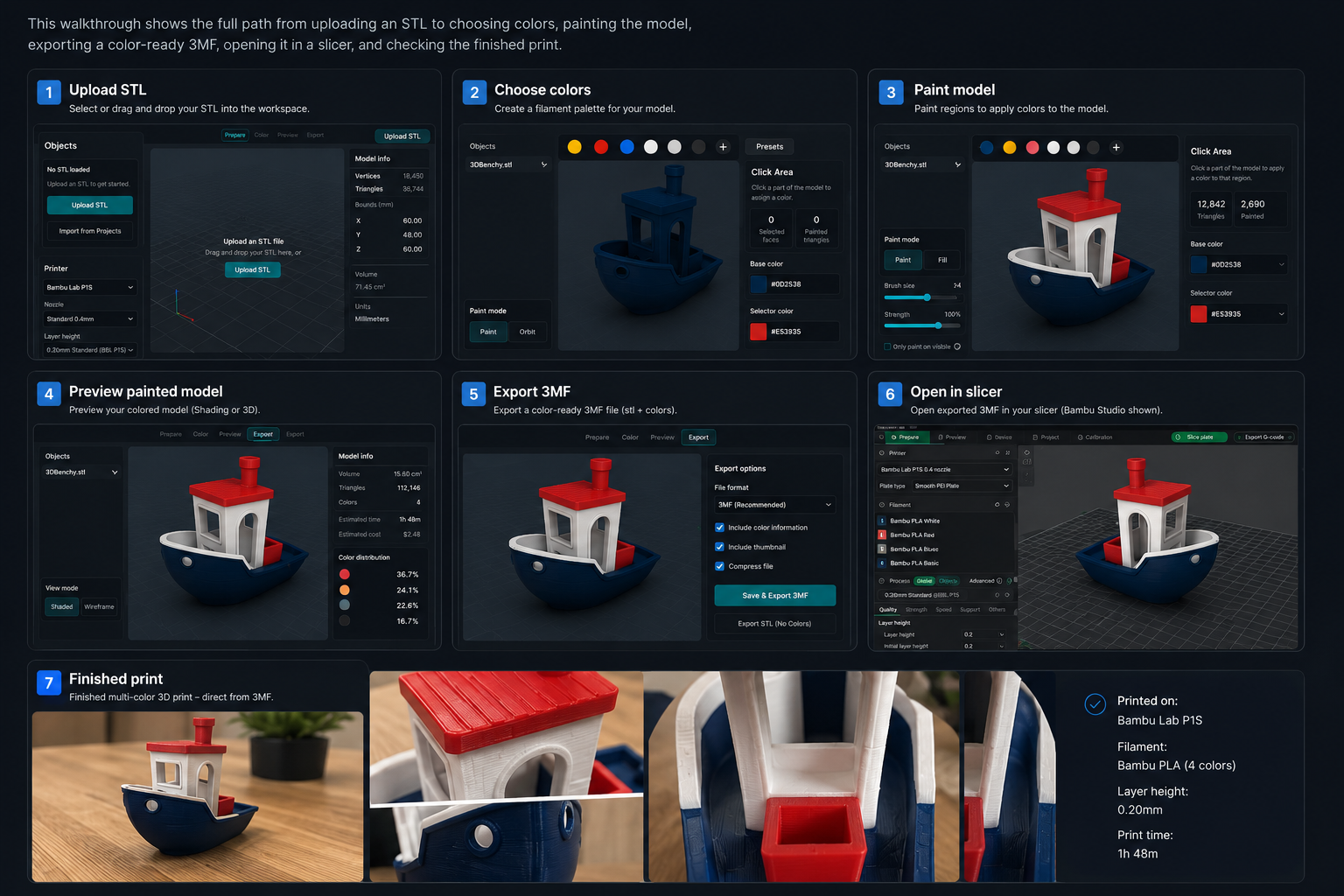
Step 1
Model geometry
Step 2
Color/material data
Step 3
Project context
Step 4
Open in slicer
Step 5
Verify before print
Browse recommendation pages matched to this topic, then use PrintNext to connect the model, printer, filament, cost, and finished result.
Beginner-friendly prints
Browse beginner-friendly 3D print recommendations that are simple, useful, low-risk, and matched to your printer and filament workflow.
Useful and practical prints
Discover functional 3D print recommendations for organizers, holders, clips, brackets, printer accessories, repair parts, and practical projects.
3MF stands for 3D Manufacturing Format. It was created for additive manufacturing workflows that need more than plain mesh geometry.
A 3MF can package richer information in one file. Support varies by tool, so always reopen the file in your slicer and verify the result before printing.
STL is broadly compatible and simple. 3MF is better when the print workflow needs color, materials, or project context to survive into the next tool.
| Feature | STL | 3MF |
|---|---|---|
| Geometry | Yes | Yes |
| Color workflow | Usually no | Often yes in supported tools |
| Project context | No | Can preserve richer context |
| Best use | Simple single-color models | Modern print workflows |
Use 3MF when you are preparing multi-color prints, preserving project context, handing a file from one tool to another, or saving a slicer-ready workflow for later.
Color Studio helps color STL workflows and export slicer-ready multicolor 3MF files, while PrintNext inventory and cost tools help verify whether the project fits the filament and printer setup you have.
A 3MF is a package for model data and related information. Some contain a simple model; others contain a slicer project with multiple objects and application-specific settings. The extension alone cannot tell you whether a file contains paint, textures, printer profiles, or previously sliced toolpaths.
Two files named dragon.3mf may behave differently. One may contain only an uncolored mesh. The other may preserve a four-color project created in a particular slicer. If the second opens without its paint in another program, that is a compatibility issue to investigate; it is not evidence that all 3MF files are interchangeable.
Use the symptom to choose the next check. Change one variable at a time and keep the original file or settings so you can compare the result.
| What you notice | What to check next |
|---|---|
| An import asks whether to load a project or geometry | Choose deliberately: geometry-only import can discard settings you expected to retain. |
| A project changes your printer profile | Restore the correct printer and review the result before slicing. |
| You need a reusable archive | Keep the source model and the saved slicer project, with notes naming the application used. |
First-party workflow evidence
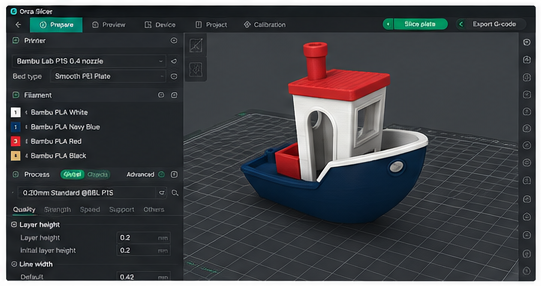
This PrintNext export was opened in OrcaSlicer so the model geometry, assigned colors, filament mapping, scale, and print settings could be checked before printing. The same verification step matters in every supported slicer.
Color Studio
Use AI or manual tools to color STL models, match real filament, and export a slicer-ready multicolor 3MF.
FAQ
3MF is better for modern workflows that need color, materials, or project context. STL is still useful for simple geometry.
3MF can store color information in many modern workflows, but you should verify color mapping in the slicer before printing.
Beginners can use STL for simple prints and 3MF when they need richer project information or color workflows.
Color Studio supports color planning and 3MF handoff workflows for slicer verification.
Your next step
Open Color Studio to add color automatically or by hand, then export a multicolor 3MF and verify it in your slicer.
Find models that fit your printer, filament, and workflow.
Color STL models with AI or manual tools and export a slicer-ready multicolor 3MF.
Keep model files, notes, revisions, and print plans together.
Track filament colors, materials, and remaining spool amounts.
Explore approved models and real PrintNext creations.
These pages connect the same workflow from file format decisions to color planning, inventory, and print cost.
Start Here
Learn what an STL file is, what it stores, what it does not store, how slicers use STL files, and when to use 3MF instead.
Format & Workflow
Compare STL and 3MF for geometry, color, materials, slicer handoff, and multi-color printing workflows.
Format & Workflow
Learn how 3MF can preserve color assignments, material data, and project metadata compared with plain STL files.
Format & Workflow
Learn how to color STL files, plan a multi-color workflow, and export a slicer-ready multicolor 3MF for modern slicers.